
Juggling several projects at once sounds like a wild ride and it can feel that way if you don’t have a solid system. Creating an effective workflow for multiple projects isn’t just about having a calendar and plenty of coffee; it’s about finding strategies that help you stay organized, keep your focus, and actually enjoy the process. I’m breaking down the steps, advice, and tools that make handling multiple projects not just doable but pretty rewarding.
Why a Strong Multi Project Workflow Matters
Managing more than one project is a reality for lots of freelancers, team leads, and business owners. Without a good workflow, things fall through the cracks really quickly. Missed deadlines, scattered files, and an endless storm of emails becomes the norm. By building a system that works for you, you get ahead of chaos and save yourself mental energy.
According to an Asana study, nearly 70% of workers reported difficulty staying on top of multiple tasks without a workflow system in place. When your tasks, files, and communication are scattered, projects just don’t move forward. Having a streamlined workflow boosts productivity, reduces stress, and helps you deliver better results (without burning out).
Project management used to rely on sticky notes and endless meetings. Today’s tools let you automate, simplify, and control moving parts no matter how many projects are spinning at once. That’s made multi project management a core skill in every industry, from design and marketing to IT and nonprofits. Plus, being able to juggle several projects at once is a big asset on your resume and can open up more opportunities—employers and clients value efficiency and reliability.
First Steps: Laying the Foundation for Multiple Projects
Kicking off a multi project workflow isn’t about finding the fanciest app out there. It starts with getting real about your needs, your team, and your style. Here’s how I start laying the groundwork:
- Project Goals: Clearly define what counts as “done” for each project. If your finish line is blurry, things tend to drift. Stating clear completion criteria also helps team members make aligned decisions.
- Scope and Deadlines: Outline key milestones and main deliverables for every project. This stops last minute scrambles and sets realistic expectations with customers or stakeholders.
- Roles and Responsibilities: Know who’s owning what, even if it’s just you. If you’re working solo, break it down by task area. Documenting roles cuts down on confusion later.
When building your base workflow, sketch out a map for each project. Paper, whiteboard, or a digital tool—just get a snapshot so you have a reference before jumping into details. This visual overview makes it easier to spot potential conflicts and spot where support might be needed.
Setting Up Your Workflow System
The way you set up your system is personal, but there are a few tried and true methods that keep things organized even when you’re spinning several plates. Here are the steps that work for me (and plenty of others)
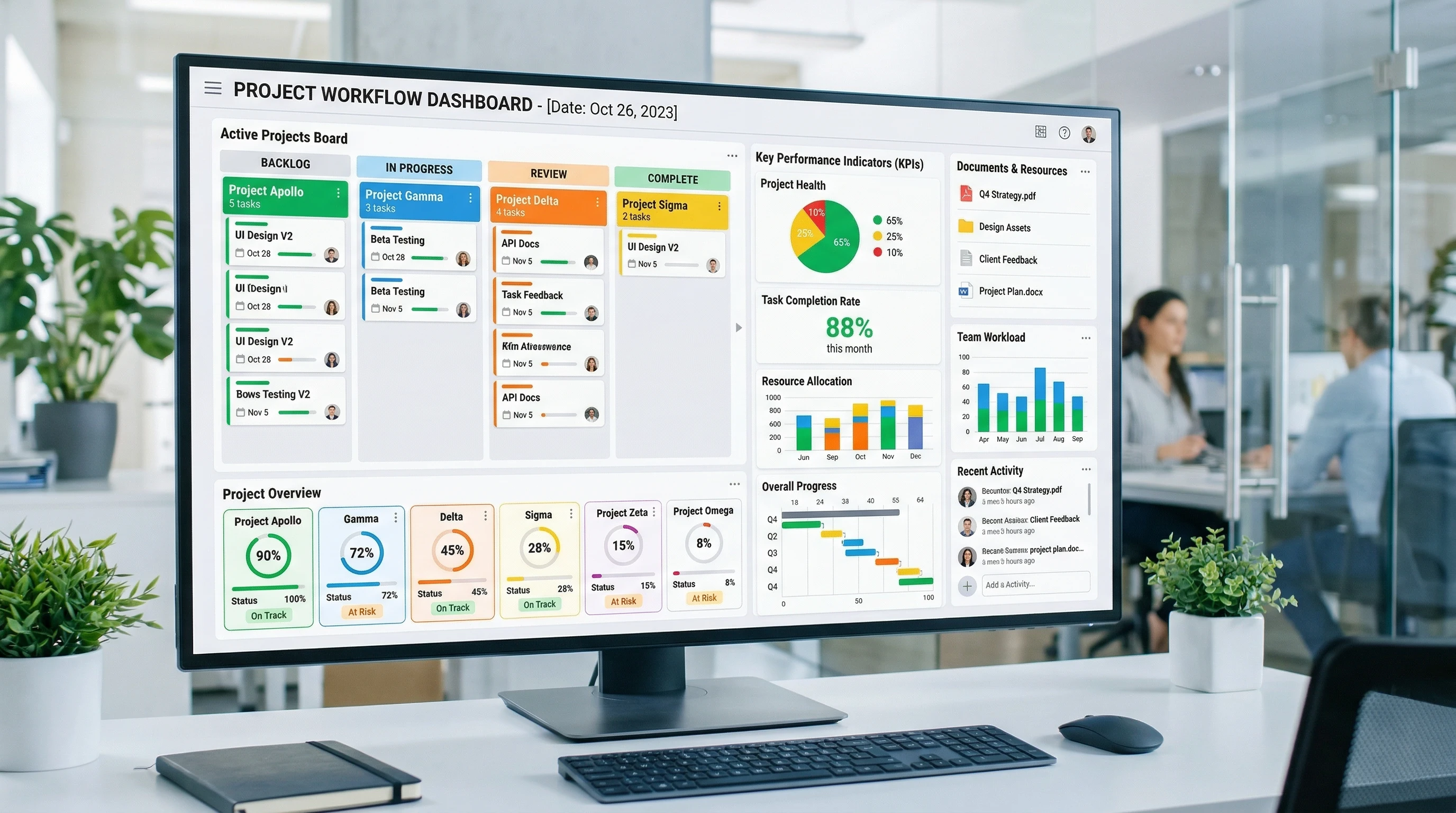
Pick a Project Management Tool: There’s no shortage of options; Trello, Asana, ClickUp, Notion, and Monday.com, just to name a handful. Most let you track progress, assign tasks, and set deadlines. I recommend Monday.com. Monday.com works very well when you need visibility across many projects at once. Strengths include:
1. Visual dashboards
- You can build dashboards showing the status of multiple projects simultaneously.
- Widgets show timelines, workloads, budgets, and progress.
2. Custom workflows
- Each project can have its own workflow.
- You can automate reminders, approvals, and status changes.
3. Cross-project reporting
- Dashboards can pull data from multiple boards to give leadership a portfolio-level view.
4. Strong integrations
- Integrates with tools like Slack, Salesforce, and many other platforms.
5. Easy adoption
- The interface is highly visual and tends to be easier for non-technical teams to adopt.
These capabilities make platforms like Monday.com especially useful for small businesses, consulting firms, and growing teams that need a clear view of multiple projects without adding unnecessary complexity.
If you want to see how a visual project dashboard can help organize multiple projects and keep teams aligned, you can explore Monday.com and see how the platform works here. Just click the link.
Centralize Information: Store everything project related in one place: briefs, documents, contact lists, and assets. This cuts down on “Where did I save that?” moments and helps with onboarding new members if your team grows.
- Break Projects Into Tasks: Divide each project into actionable steps. Tasks should be specific (e.g., “Design home page mockup” instead of “Work on site”) and easy to track as done or not done.
- Prioritize and Schedule: Put high reward, time sensitive work first. Use calendars or Gantt charts to visualize deadlines across projects and keep key milestones front and center.
- Set Up Regular Check Ins: A short daily or weekly review keeps everything on the radar. I block out time each week just to review current progress and next steps; this step is great for resetting priorities if projects evolve.
Workflow Hacks for Switching Between Projects
Moving from one project to the next all day takes energy, and context switching eats up focus. Here’s how I cut the drag when I have to jump between two or more big tasks:
- Time Blocking: Set aside blocks of time for each project (e.g., Project A in the morning, Project B after lunch). This limits the mental overhead of switching gears every few minutes and makes deep work possible.
- Themed Days: Dedicate a day to deep work on a single project if possible. I try to stack meetings or admin tasks together so I can have “maker time” for focused work. Even a half day theme can make a difference.
- Use Templates and Automation: For repeated processes (like onboarding a new customer or sending out reports), having templates or automation macros cuts out the copy paste work and reduces mistakes.
- Buffer Time: Schedule a 10-15 minute reset when changing from one project to another. A quick walk or a notebook brain dump helps wipe the slate clean before tackling the next challenge and keeps fatigue from building up.
Common Challenges (and How to Tackle Them)
Managing several projects means you’re bound to hit a few roadblocks. These are the hurdles I see the most, along with the ways I manage or sidestep them:
- Overlapping Deadlines: There are going to be crunch times. I flag deadlines in red in my system so I can’t miss them, and set up midpoint check ins to review progress before the rush. Transparency helps manage expectations if delays are possible.
- Competing Priorities: When two customers or teammates want something “ASAP,” get clear about which task has more impact and communicate honestly about timelines. Most people are understanding if you keep them in the loop, and honesty helps protect your bandwidth.
- Communication Mix Ups: If you’re working with different teams or customers, messages get lost fast. I use separate chat channels or email threads for each project to keep communication straight forward and reduce the need to back track endlessly for key info.
- Scope Creep: Watch for extra requests sneaking into projects. When someone asks for “one quick thing,” pause and see how it affects your schedule. It’s okay to say, “I’ll add that to the next phase.” Protecting your time means better quality, not just more work.
Handling Clashing Deadlines
Nothing brings on stress faster than realizing two big projects are due at the same time. Here’s what I do: map project timelines early and share visibility with anyone involved (using calendar tools or Gantt charts). If I spot a pile-up, I negotiate deadlines or redistribute tasks right away instead of hoping I’ll magically get more hours in a day. Having buffers for deliverables also lets you handle last minute changes with less anxiety.
Maintaining Focus (When Everything Feels Urgent)
It’s easy to feel like everything needs your attention at once. I’ve found that setting daily “focus goals” (no more than three big tasks per day) helps cut the noise. Even during busy weeks, picking your most important actions and doing them first builds momentum and reduces stress. These focused blocks give a sense of progress even with a packed schedule.
Advanced Tips for Multi Project Pros
Once the basics are rolling, adding a handful of advanced practices can really up your game. These help fine-tune your process and make it more adaptable:
Color Coding and Tagging: Assign each project a color or tag in your project tool. At a glance, you can see where your attention is most needed and avoid missing critical paths.
Batch Similar Tasks: Knock out similar work (like emailing, reviewing docs, or editing) across all projects in one go. This cuts down on repetition and helps maintain energy because you’re not bouncing between different types of thinking.
Regular Debriefs: After finishing a project or major milestone, jot down what worked and what tripped you up. These lessons make the next round smoother; sharing takeaways also lifts up the whole team.
Keep a Backlog: Ideas and requests that don’t fit current projects can go onto a backlog list. This way, you don’t lose ideas, but you’re not derailing the current workload. Backlogs act as safety nets for future improvements.
The Tools That Make Multi Project Workflows Smooth
Having the right tools isn’t everything; the wrong tool can really slow you down. Here are a few I’ve tested and recommend for juggling more than one project:
- Trello/Asana: Perfect for visualizing tasks and moving them through stages. Great for solo folks or small teams, and intuitive enough for quick onboarding.
- Notion: Offers databases, templates, calendars, and docs all in one spot. Super handy for building custom dashboards and tracking progress. For visual folks, it’s a dream come true when organizing information.
- Google Workspace: Shared Drives and Google Calendar make team collaboration seamless and keep documents easy to find. The seamless integration with other apps is a big plus.
- Automation Tools (Zapier, Make): Automate repetitive admin such as data entry, notifications, or routine reporting; these help you focus on creative or strategic work.
- Pomodoro Timer Apps (Focus Booster, Tomato Timer): Encourage focus sprints and scheduled breaks, making it less likely you’ll burn out. These timers can transform marathon workdays into productive, manageable sessions.
The trick is to pick a stack that feels comfortable, not overwhelming. Start small and add more tools if your current process feels stretched. When your toolset grows with you, it keeps things simple and stress free.
Practical Examples: What a Workflow Looks Like DaytoDay
A real-life workflow for multiple projects isn’t one size fits all, but here’s what mine looks like most days:
- 8AM – 9AM: Scan all project dashboards and flag priorities for the day.
- 9AM – Noon: Focus block for deep work on Project A tasks. No emails or calls.
- Noon – 12:30PM: Break and review any quick wins.
- 12:30PM – 2PM: Batch similar tasks (respond to emails, check in with team, update trackers) across all projects.
- 2PM – 4PM: Dedicated time for Project B (or switch to Project C on certain days).
- 4PM – 4:30PM: Daily wrap-up and review. Update status in project tools, jot down next actions for tomorrow.
This structure lets you adjust when priorities change, but sets a rhythm that’s easy to return to when things get hectic. Adding simple rituals like “priority check” at the beginning and end of each day keeps you on track.
FAQs About Managing Multiple Projects at Once
This topic comes up a lot, so here are some answers people often look for:
Question: How do I decide what project gets my attention first?
Answer: I usually weigh deadlines, customer expectations, and project value. The highest priority (by impact or deadline) gets the first focus block of my day.
Question: What if I’m a solo freelancer—do I really need a workflow tool?
Answer: Even if you’re working solo, having a workflow tool saves time searching for notes, helps prevent forgotten tasks, and lets you see your week at a glance. Many tools are free or have affordable plans, so try one that fits your style and needs.
Question: How do I avoid burnout when I have too much going on?
Answer: It helps to schedule breaks just like meetings, block out “no work” time, and limit your daily focus goals to the most important tasks. Saying no or renegotiating deadlines when needed is also super important. Remember, quality beats quantity for long-term success.
Wrapping Up: Building Your Multi Project Flow
Getting a handle on multiple projects isn’t about doing more work; it’s about working smarter with the right systems in place. Start simple, tweak your workflow as you go, and always make space for check ins and adjustments. Whether you’re managing client work, personal side gigs, or team based projects, a strong workflow helps you enjoy the process, keep your sanity, and look good doing it. Happy juggling!
Hi, this is very relatable to me. Currently for me there is eBay (2 accounts), Amazon and Vinted and there are my 3 websites. The ecommerce stuff I don’t have much choice about ignoring or putting of for the most part but still time management is very important if I too want to dedicate time to my websites. I see someone say recently that time is your most valuable asset and sometimes delegating is more than anything about buying someone’s time. I would like to delegate a bit more I think really but taking what you are saying into account – the whole micro managing tasks etc. That is what I want to do more. I actually find myself doing not much at all sometimes and I think it is always time better spent but its like without the work flow there I’m kind of not sure what I’m doing.
This was such a practical and well-explained guide—I really like how you broke down both the mindset and the tools needed to handle multiple projects without feeling overwhelmed. The part about time blocking and setting daily focus goals really stood out to me, especially for maintaining productivity. I’m curious though, how do you personally adjust your workflow when unexpected urgent tasks suddenly disrupt your planned schedule? Do you reshuffle everything immediately or have a buffer system that absorbs those surprises? I’d love to hear how you handle that in real-life situations, especially when managing multiple high-priority projects at once.
Thanks for the comment.
I would fit the new tasks into the plan. I wouldn’t reshuffle but I would squeeze the tasks in. I am assuming that the new tasks are in addition to projects that are already being worked on and not some new project.
If it is a constant need for juggling I recommend using a product like Monday.com to assist. It is excellent in helping businesses like you describe.